

Overview
Sorting changes the order of product listings, so users can choose their preferred criteria for arranging products.
Athena offers two sorting methods: relevance and ranking. Relevance sorting uses Athena’s relevance model, which applies machine learning concepts to optimize search engines, enhance user experience and boost sales. It is typically the best choice for initial product sorting.
Set up sorters
In the Athena Dashboard, under Settings -> Landing Page, you can customize search sorters and set the default sorting for both search and category pages.
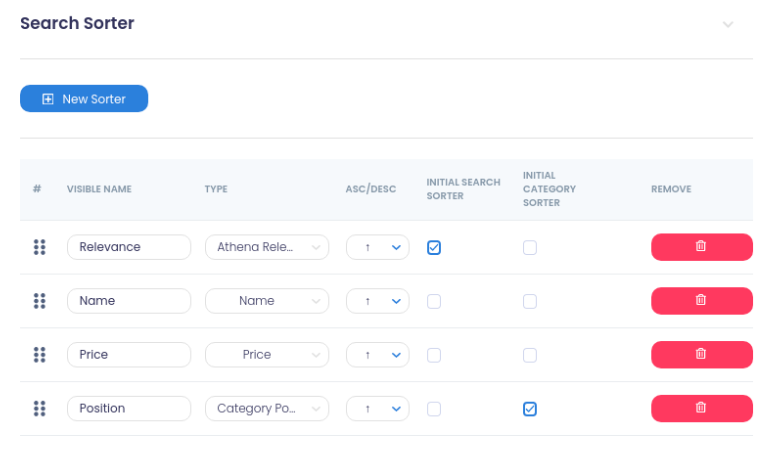
The Search API and Category API return the sorters you created as an array in their response.
{
   "products": {
     "results": [
          ...
     ],
     "amounts": [
          ...
     ],
     "active_filters": [
          ...
     ],
     "filters": [
          ...
     ],
     "sorters": [
         {
            "option_key": "product_list_order",
            "option_value": "relevance",
            "option_label": "Relevance",
            "url": "http://www.local.com/athena/?q=m&product_list_order=relevance",
            "url_path": "/?q=m&product_list_order=relevance",
            "url_params": {
                "q": "m",
                "product_list_order": "relevance"
            }
            "selected": true
         },
         {
            "option_key": "product_list_order",
            "option_value": "name_asc",
            "option_label": "Name",
            "url": "http://www.local.com/athena/?q=m&product_list_order=name_asc",
            "url_path": "/?q=m&product_list_order=name_asc",
            "url_params": {
                "q": "m",
                "product_list_order": "name_asc"
            }
            "selected": false
         },
         {
            "option_key": "product_list_order",
            "option_value": "price_asc",
            "option_label": "Price",
            "url": "http://www.local.com/athena/?q=m&product_list_order=price_asc",
            "url_path": "/?q=m&product_list_order=price_asc",
            "url_params": {
                "q": "m",
                "product_list_order": "price_asc"
            }
            "selected": false
         }
      ]
      ...
   }
}
Sort a request
To sort products, product_list_order is a required field. Its value is the value of the field option_value.
Search API request
{
   "q": "Yoga",
   "token": "{{ token }}",
   "product_list_order": "price_asc"
}
Category API request
{
   "category": "14",
   "level": "2",
   "token": "{{ token }}",
   "product_list_order": "price_asc"
}