Semantic product search
When shoppers describe what they need, not what it’s called.
A shopper types “comfortable shoes for standing all day”. Your catalogue has “Women’s Perforated Comfort Sneaker” and “Slip Resistant Soft Toe Work Shoe”. Keyword search only finds products that share the shopper’s words. Semantic search also looks for products that mean the same thing. Athena uses both.

 Semantic product search
- Keyword Shoes
- Meaning Cushioned, supportive
- Meaning On your feet all day
- Filter Women
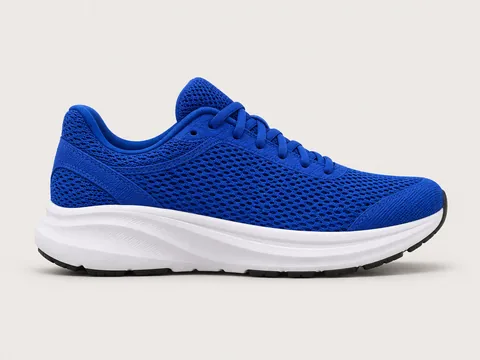
Cloud Comfort Walker
$89Match
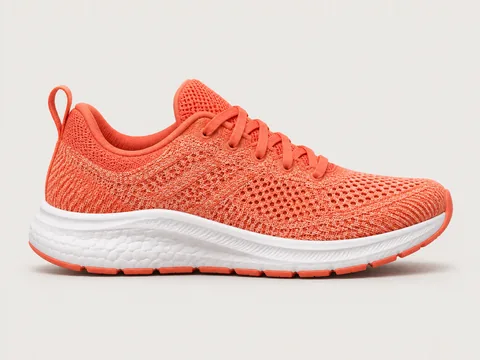
Soft Step Knit Sneaker
$75Match
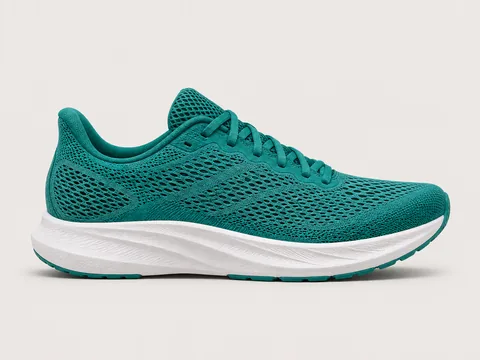
All-Day Mesh Trainer
$95Match
- Keyword
- “Shoes” matched the Shoes category.
- Semantic
- “Comfortable” and “standing all day” found cushioned, supportive shoes, though no product uses those words.
- Filter
- The Women filter keeps only women’s shoes. A filter is a hard limit.
Shoppers search in sentences. Catalogues are written in product names.
People search a store the way they’d ask a shop assistant. They name the situation (“for standing all day”, “for a beach wedding”), the person (“for nurses”) or the feeling (“comfortable”). Product names and descriptions are written by suppliers and merchandisers, in their own vocabulary.
When search only matches words, two things go wrong:
- Good products are missed because their name uses different words: “work shoe” instead of “shoes for long shifts”.
- The wrong products surface because they share a word with the query. On the live demo, the phrase
standing all dayon its own brings up T-shirts with “Standing Rock” and “All Day” printed on them.
At worst, the shopper gets searches that return nothing.
Keyword search and semantic search, ranked together
- Keyword search finds products that contain the shopper’s words. It is the right tool for exact names, brands and SKUs.
- Textual semantic search finds products whose names and descriptions mean the same thing, even when the words differ. Visual semantic search brings in what the product photos show.
- Athena’s own relevance system combines what the three find and decides which products rank first. The Athena team tunes that relevance for your catalogue; your team can still pin, boost or exclude products for any search.
Conceptual illustration
comfortable shoes for standing all day
- Keyword: shares the shopper’s words
- Textual semantic: means the same thing
- Visual semantic: looks right
Athena’s relevance ranks one list
Your rules on top: pin, boost, exclude
Try it on a live catalogue
Live Athena demo on a public dataset of 500,000+ Amazon Fashion products, not a client store.
Step 1. Just the situation: standing all day (opens in a new tab)
983 results, led by T-shirts: “I Stand With Standing Rock”, “Pretzel Day”, “Pajamas All Day”. With no product word in the query, the search has nothing to go on but the words themselves.
Step 2. The full description: comfortable shoes for standing all day (opens in a new tab)
928 results, and all of the first 40 are footwear: a perforated comfort sneaker, diabetic shoes, walking shoes, an orthopedic stretch shoe, a slip-resistant work shoe. Add the product type and the description starts working for the shopper.
Not every result is a perfect fit. On the same page we saw a $1.29 gladiator sandal (#11), house slippers (#20) and fur-lined winter boots (#27). That’s the real result list, and it’s why the ranking can be tuned per catalogue.
Step 3. A job instead of a product: shoes for nurses (opens in a new tab) and work shoes for long shifts on my feet (opens in a new tab)
140 and 170 results. Nursing clogs come first for the first query; slip-resistant food-service and safety shoes for the second. Neither query is a product name.
Step 4. Let the shopper narrow it down
On the comfortable shoes for standing all day results, choose the Women category: 579 products. Then add the brand Clarks: 35. Filters come from your product attributes and the shopper picks them; the search doesn’t add filters on its own.
The demo catalogue only has brand and category attributes, so “comfortable” and “all day” are matched in product names and descriptions, not in a comfort attribute. The demo doesn’t show which part of the search found each product, and we don’t label results that way.
Results observed in fall 2026; the demo can change.
Exact words still count
Semantic search doesn’t replace keyword search. When a shopper types a brand, a product name or a SKU, the exact match should win, and it does: on the live demo, clarks (opens in a new tab) returned 140 results, all Clarks. A single strong match, such as an exact SKU, can take the shopper straight to the product.
That’s why Athena runs keyword, textual semantic and visual semantic search together instead of choosing one. Omnispect Search is the product, and its page has illustrated examples of hybrid search: a product name, a SKU, a synonym, a description, a visual detail and a combination.
What changes for your shoppers and your team
Shoppers can search in their own words.
A description of the situation or the person returns the right product types, as long as the product type is in the query or the catalogue text supports it.
No need to predict every phrasing.
Your team doesn’t have to write a synonym for every way a shopper might describe a product; synonyms and redirects stay available for the cases that need them.
Your team keeps the last word.
Relevance is tuned by the Athena team for your catalogue, and merchandising rules let you pin, boost or exclude products for any search.
Questions about semantic product search
What is semantic product search?
Search that matches what a query means, not only the words in it. In a store, it means a description such as “outfit for a beach wedding” can find products whose names never use those words. Athena combines it with keyword search, so exact names and codes still match exactly.
Is semantic search the same as hybrid search?
In Athena, semantic search is a component of a hybrid search that uses keyword, textual semantic and visual semantic in combination, for the perfect results.
Does it understand typos too?
Yes, typos and spelling variations are interpreted automatically: “sneakrs” returns sneakers on the live demo.
What if the shopper has no words for it?
They can search with a photo: upload or take one, crop it, and get the closest matching products from your catalogue.
Do I need to rewrite my product data?
No rewrite is needed to start: Athena indexes the names, descriptions and attributes you already have. Richer descriptions and attributes give both keyword and semantic search more to work with.
Which platforms does it work with?
Shopify, Adobe Commerce, WordPress and WooCommerce, and any other stack through the Open API. See integrations.
See what Athena can do for your business.
Explore your catalogue, integration needs, and opportunities to improve product discovery with our team.
Developed by Syncit Group, certified to ISO 9001 and ISO/IEC 27001
GDPR-compliant
Hosted on AWS in the EU and US, running 24/7
Typically live in 2–3 weeks